



We have all experienced that: you have just commented some sarcastic comment on the picture of your friend, only to realize that a second later, autocorrect has messed your compliment up. For years, the only solution was the “delete and repost” walk of shame.
Well, those days are over. Instagram has finally rolled out a comment editing feature, though in typical social media fashion, it comes with a few specific rules you need to know.
How to Edit Your Comment on Instagram?
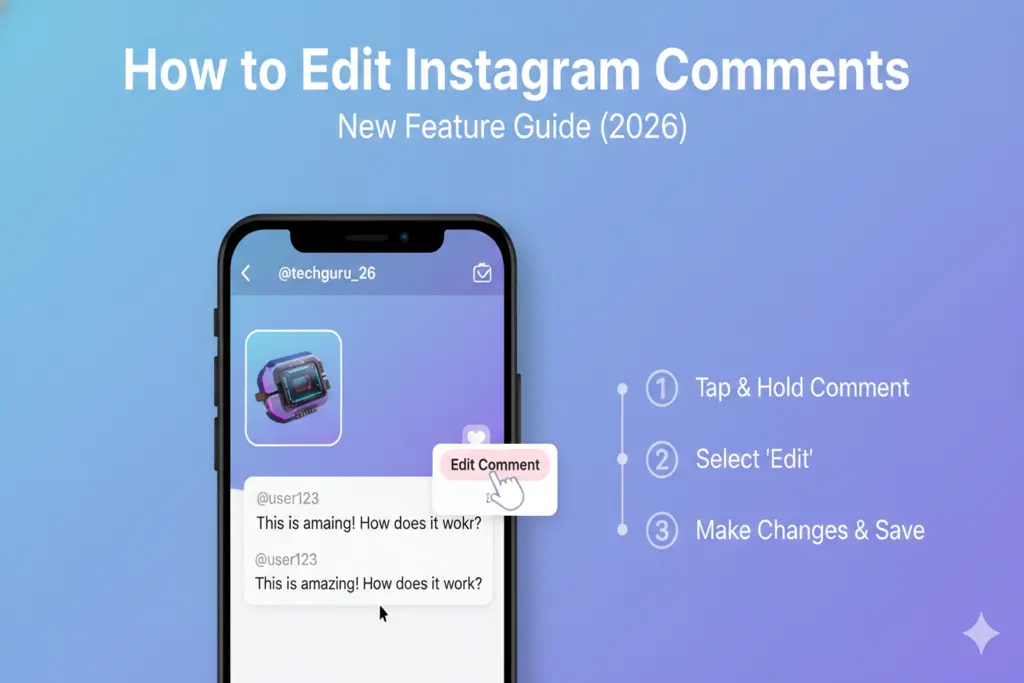
Making an edit on a comment is very simple, but behind a long-press. The following is the way:
- Find your comment on the post.
- Long-press (tap and hold) on the text of your comment.
- From the pop-up menu, select Edit.
- Fix your typo or change your message and tap Done or the checkmark.
Things to Know About Edit Comment Feature on Instagram
While this is a massive win for the “typo-prone” among us, Instagram has put some guardrails on the feature to prevent people from completely changing the context of a conversation hours later.
The 15-Minute Countdown
This is the most important rule. You get 15 minutes after you put your post before making your changes. The edit option will not appear after 15 minutes. In case you make a mistake at minute 16, you have to use the old fashioned delete and retype technique.
Infinite Revisions (When the Clock Tickings)
The good news? As a perfectionist, you can make as many revisions as you desire to that same comment within those 15 minutes.
Text Only
The update is strictly for text. If you posted a comment that includes both text and an image, you can fix the words, but you cannot swap out or edit the photo part of the comment.
The “Edited” Label
To keep things transparent, Instagram will add an “Edited” label next to your comment’s timestamp. This informs all the people that the original message has been edited.
Privacy Notice: Unlike Facebook, Instagram does not as of now provide other users with your edit history. They will know that you edited it, but they won’t be able to see the original embarrassing typo.
Instagram Comment Editing Rules
| Feature | Constraint |
| Time Limit | 15 Minutes |
| Edit Count | Unlimited (within 15 mins) |
| Media | Text only (Images cannot be edited) |
| Visibility | “Edited” label will appear |
| Edit History | Hidden from other users |