


In the last few years, when you have purchased an iPhone, you must have probably seen a feature in your display settings, called True Tone. Although it is usually switched on by default, most users are not aware of what exactly it is up to. Being not a battery-consuming environment by any means, True Tone is among the most useful features that Apple offers to soothe the eye strain.
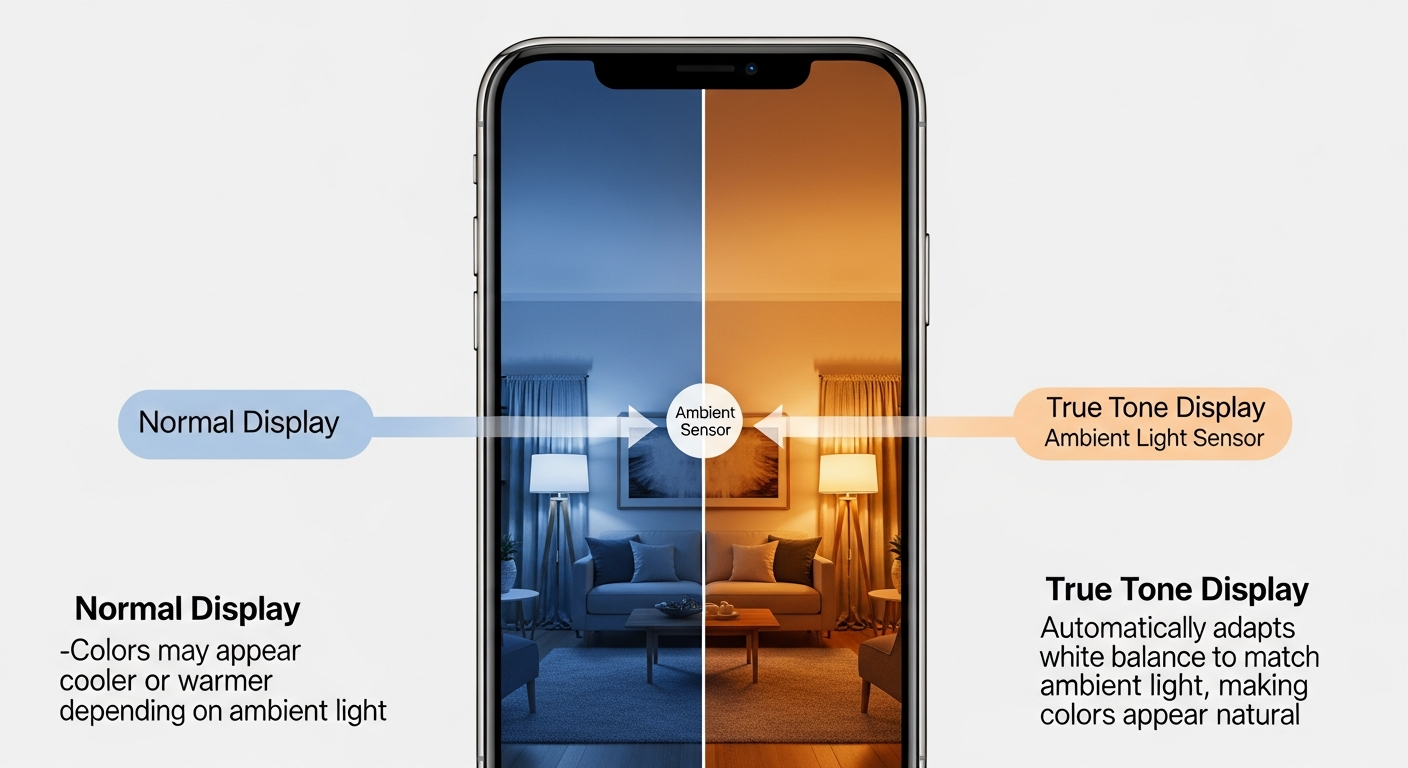
True Tone, in its most basic form, is a display technology that will automatically regulate the White Balance of your screen to suit the surrounding light. It operates on highly developed multichannel sensors that are located close to the front-facing camera and ensures that the color and brightness of the surrounding environment is measured in real-time.
To know why this is important, consider a piece of white paper that is physical. Look at that paper in a room where there is warm, yellow candlelight and what the paper will reflect is that yellow light. When you put it out under a blue sky it is colder and whiter. This shift is natural in the eyes of ours.
Nonetheless, the display on a typical smart phone is a fixed yellow-blue white light, no matter where you are. The unnatural quality of this pure digital light can be impressive and shocking in a badly-lit room. True Tone corrects this by ensuring that your screen is acting like that piece of paper, that is, it warms up the screen when you are indoors, and cools down when you are outside. This renders reading a text or rather surfing the web more natural and less of gazing on a lightbulb.
The difference between True Tone and Night Shift?
One of the biggest misconceptions is that True Tone resembles the so-called Night Shift since they can be used in a very different way.
Night Shift is a feature enabled automatically (typically at sunset to sunrise) with the heavy orange filter applied to the screen to avoid blue light to help you get a better sleep.
True Tone works 24/7. It is far less obtrusive than Night Shift and attempts to maintain a consistent appearance of colors instead of altering them in the name of sleep hygiene.
Both features can be used together and it would be recommended to do so in order to be as comfortable as possible.
When Should You Turn It Off?
As a rule, True Tone is actually a great feature, but one thing is when you need to disable it because of Color Critical Work.
True Tone can act as a barrier to you as long as you are a photographer, graphic designer, or video editor using your iPhone to work. Since it changes the appearance of white on your screen depending upon the brightness in your room, it may deceive you into color-grading a photograph the wrong way. When you have to view the actual correct colors of an image, then it is better to turn off True Tone temporarily.
How to Toggle True Tone
It is easy to control this feature. Switch is located in settings, display and brightness or via the faster Control Center:
Tap down to Control Center.
Drain on the Brightness Slider.
The bottom right corner has the True Tone icon, which can be turned on or off by tapping it.