



Close Menu
    What's Hot
    IT Internship Program

    Punjab IT Internship Program: Benefits, Eligibility and Application Process

    November 18, 2025
    How to Merge Cells in Excel

    How to Merge Cells in Excel

    November 18, 2025
    difference between active and passive income

    What is Difference Between Active and Passive Income

    November 18, 2025

    Subscribe to Updates

    Get the latest creative news from FooBar about art, design and business.

    Facebook X (Twitter) Instagram
    • News
    • Entertainment
    • International
    • Sports
    • Trends
    Facebook X (Twitter) Instagram
    Pakistan Truth
    • News
    • Entertainment
    • International
    • Sports
    • Trends
    Pakistan Truth
    You are at:Home»News»How to Check Your Laptop Generation?
    News

    How to Check Your Laptop Generation?

    Rizwan YousafBy Rizwan YousafApril 12, 2025No Comments2 Mins Read
    Facebook Twitter Pinterest LinkedIn Tumblr Email
    How to Check Your Laptop Generation
    Share
    Facebook Twitter LinkedIn Pinterest Email

    Knowing what generation your laptop belongs to can help you get information about its performance capabilities, compatibility to software and resale value. 

    This step by step guide will help you find out what generation your laptop is, whether you are getting a new device and upgrading software. 

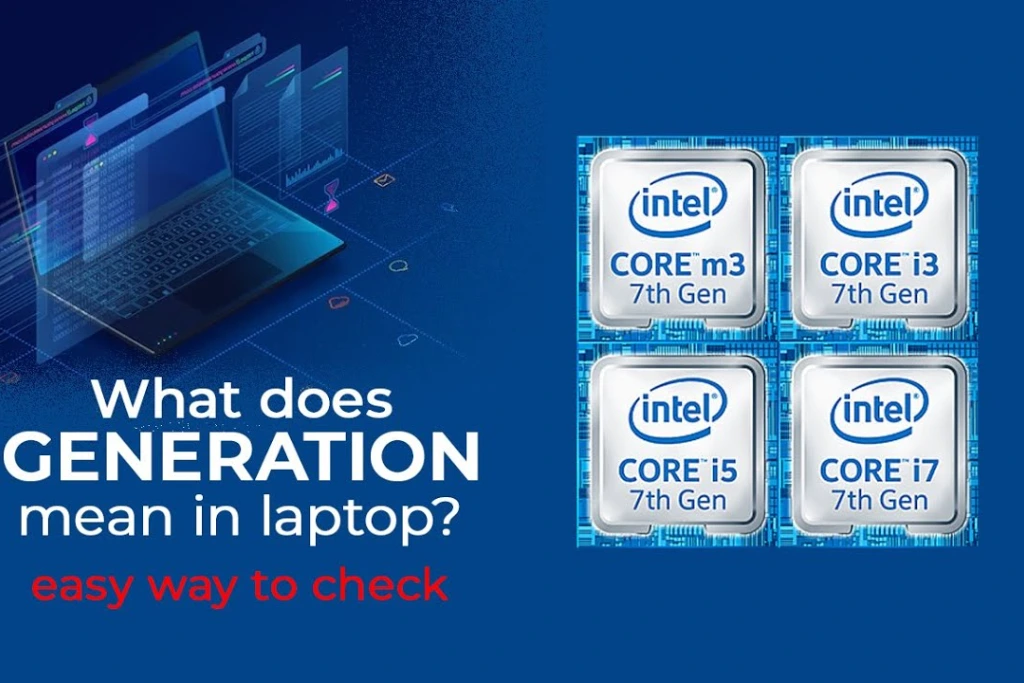
    What does generation mean in laptops?

     Generation of a laptop typically means the generation of the processor (CPU) found inside the laptop. For example, the Intel processors are available in multiple generations like 6th Gen, 7th Gen, 10th Gen, 11th Gen etc.

    Check Laptop Generation via System Information

    Step 1: Open System Information

    • Press Windows + R to open the Run dialog.
    • Type msinfo32 and press Enter.

    Step 2: Find Processor Info

    • A new window will open showing your system’s specifications.
    • Look for the Processor entry.

    Example:

    Processor: Intel(R) Core(TM) i5-1135G7 CPU @ 2.40GHz

    In this example, 1135G7 tells you that this is an 11th generation processor. The first two digits after i5 (in this case 11) indicate the generation.

    Check Laptop Generation via Settings

    1. Click on the Start menu and select Settings.
    2. Navigate to System > About.
    3. Scroll down to Device Specifications.
    4. Find the Processor details and identify the generation using the same rule:
      The first two digits in the processor model number (after i3, i5, i7, or i9) indicate the generation.

    Check Laptop Generation Via Box or Manufacturer’s Website

    If your laptop is new or you still have the original box, the generation might be printed there. You can also:

    1. Visit the manufacturer’s official website (Dell, HP, Lenovo etc.).
    2. Enter your laptop model number in the search bar.
    3. Open the product specifications to find details about the processor generation.
    Read Also:  Federal Minister Praises Ban on Indian Songs Amid Rising Tensions

     Use Laptop Generation Via Third Party Tools 

    There are tools that give detailed hardware info including CPU generation:

    • CPU-Z is a Lightweight software for processor details.
    • Speccy offers a full system summary including CPU generation.
    • HWInfo is an advanced system analyzer with deep hardware data.

    Share. Facebook Twitter Pinterest LinkedIn Tumblr Email
    Previous ArticleHow to Write Urdu in MS Word ?
    Next Article ICC Announces Support for Exiled Afghan Women Cricketers
    Rizwan Yousaf
    • Website

    Rizwan Yousaf is a technology and startup journalist who writes about Pakistan’s digital transformation. His reporting focuses on innovation, entrepreneurship, and the growing tech ecosystem shaping the country’s future economy.

    Related Posts

    IT Internship Program

    Punjab IT Internship Program: Benefits, Eligibility and Application Process

    November 18, 2025
    How to Merge Cells in Excel

    How to Merge Cells in Excel

    November 18, 2025
    Punjab E-Taxi Scheme Balloting Date Announced in Punjab

    Punjab E-Taxi Scheme Balloting Date Announced: Your Ultimate Guide to Eligibility

    November 18, 2025
    Leave A Reply Cancel Reply

    Latest Posts
    IT Internship Program

    Punjab IT Internship Program: Benefits, Eligibility and Application Process

    November 18, 20252
    How to Merge Cells in Excel

    How to Merge Cells in Excel

    November 18, 20251
    difference between active and passive income

    What is Difference Between Active and Passive Income

    November 18, 20251
    Punjab E-Taxi Scheme Balloting Date Announced in Punjab

    Punjab E-Taxi Scheme Balloting Date Announced: Your Ultimate Guide to Eligibility

    November 18, 20254
    Don't Miss

    Top 10 Hi-Tea Restaurants In Lahore For A Perfect Outing

    By Usman LatifMarch 14, 2025

    Lahore is a well-known city known for its huge food culture, & hi-tea has become…

    Top 5 places to Visit in Kashmir

    Top 5 Places to Visit in Kashmir

    April 5, 2025
    India Planning Military Action Against Pakistan Within 36 Hours Tarar

    India Planning Military Action Against Pakistan Within 36 Hours: Tarar

    April 30, 2025
    Stay In Touch
    • Facebook
    • Twitter
    • Instagram

    Subscribe to Updates

    Get the latest creative news from SmartMag about art & design.

    IT Internship Program

    Punjab IT Internship Program: Benefits, Eligibility and Application Process

    November 18, 2025
    How to Merge Cells in Excel

    How to Merge Cells in Excel

    November 18, 2025
    difference between active and passive income

    What is Difference Between Active and Passive Income

    November 18, 2025
    Punjab E-Taxi Scheme Balloting Date Announced in Punjab

    Punjab E-Taxi Scheme Balloting Date Announced: Your Ultimate Guide to Eligibility

    November 18, 2025
    Popular

    Top 10 Hi-Tea Restaurants In Lahore For A Perfect Outing

    March 14, 2025
    Top 5 places to Visit in Kashmir

    Top 5 Places to Visit in Kashmir

    April 5, 2025
    India Planning Military Action Against Pakistan Within 36 Hours Tarar

    India Planning Military Action Against Pakistan Within 36 Hours: Tarar

    April 30, 2025
    India Suspends Indus Waters Treaty and Closes Attari Border After Pahalgam Attack

    India Suspends Indus Waters Treaty and Closes Attari Border After Pahalgam Attack

    April 23, 2025
    Latest News
    IT Internship Program

    Punjab IT Internship Program: Benefits, Eligibility and Application Process

    November 18, 2025
    How to Merge Cells in Excel

    How to Merge Cells in Excel

    November 18, 2025
    difference between active and passive income

    What is Difference Between Active and Passive Income

    November 18, 2025
    Punjab E-Taxi Scheme Balloting Date Announced in Punjab

    Punjab E-Taxi Scheme Balloting Date Announced: Your Ultimate Guide to Eligibility

    November 18, 2025
    About Us
    About Us

    Pakistan Truth is your go-to platform for authentic insights into current affairs, entertainment, sports, and more, with a strong focus on the Pakistan region.

    Unveiling the truth, shaping perspectives—Pakistan Truth.

    Email Us: [email protected]

    Facebook X (Twitter) Instagram
    © 2025 PakistanTruth. All Rights Reserved.
    • About Us
    • Contact Us
    • Terms & Conditions
    • Privacy Policy

    Type above and press Enter to search. Press Esc to cancel.