


Close Menu
    What's Hot
    Why the Iran War Triggered a Devastating Republican Wipeout in Midterms

    Why the Iran War Triggered a Devastating Republican Wipeout in Midterms

    November 4, 2026
    How to Use WhatsApp Recent Media Suggestions Update for Faster Photo Sharing

    How to Use WhatsApp Recent Media Suggestions Update for Faster Photo Sharing

    November 4, 2026
    PTA Register BIGO LIVE and Likee: Formal Platform Onboarding Complete

    PTA Register BIGO LIVE and Likee: Formal Platform Onboarding Complete

    November 4, 2026

    Subscribe to Updates

    Get the latest creative news from FooBar about art, design and business.

    Facebook X (Twitter) Instagram
    • News
    • Entertainment
    • International
    • Sports
    • Trends
    Facebook Instagram TikTok RSS X (Twitter)
    Pakistan Truth
    • News
    • Entertainment
    • International
    • Sports
    • Trends
    Pakistan Truth
    You are at:Home»Tech»How to Use WhatsApp Recent Media Suggestions Update for Faster Photo Sharing
    Tech

    How to Use WhatsApp Recent Media Suggestions Update for Faster Photo Sharing

    Farhan QureshiBy Farhan QureshiNovember 4, 2026Updated:November 4, 2026No Comments4 Mins Read
    Facebook Twitter Pinterest LinkedIn Tumblr Email
    How to Use WhatsApp Recent Media Suggestions Update for Faster Photo Sharing
    Share
    Facebook Twitter LinkedIn Pinterest Email

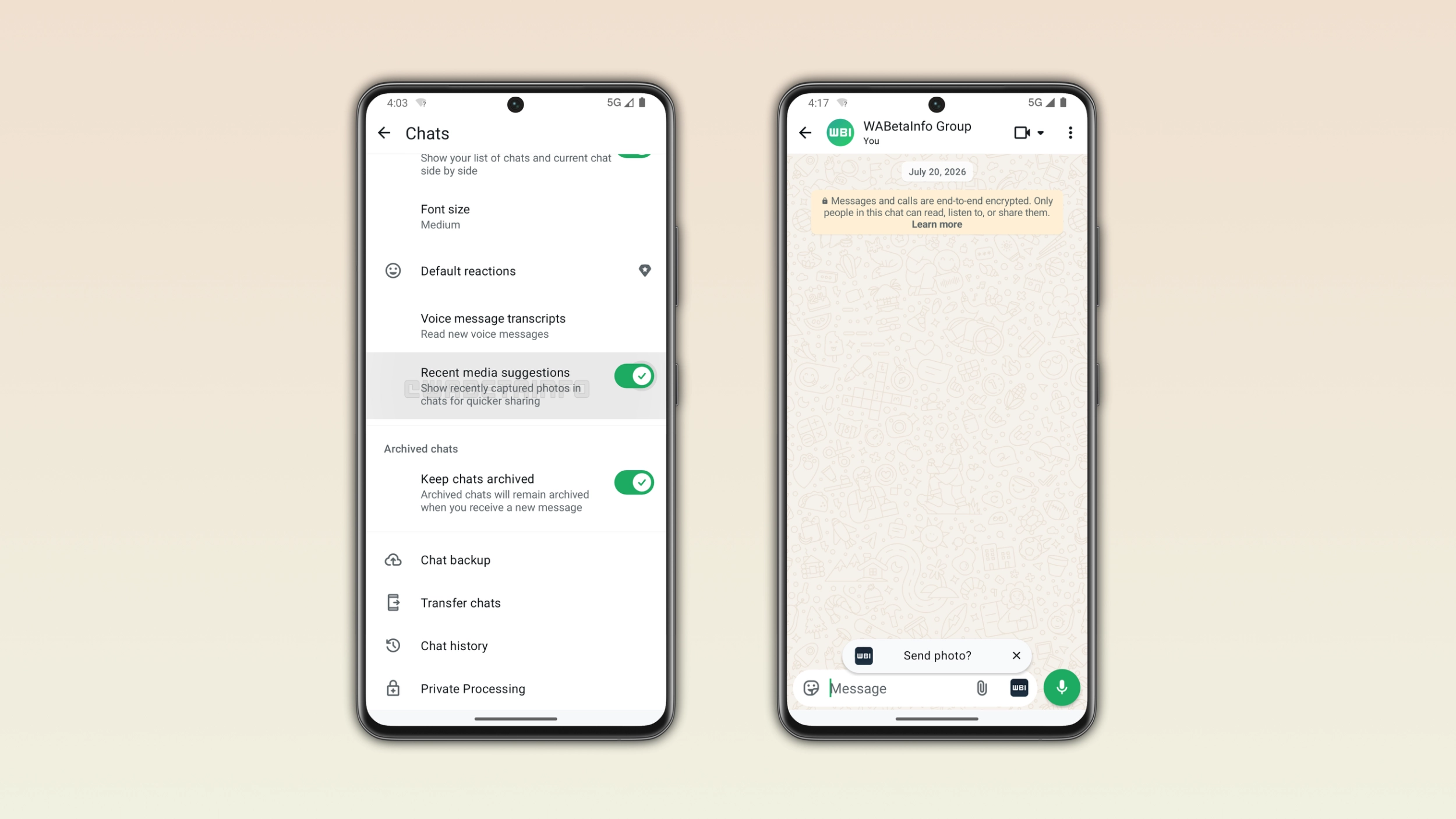
    The WhatsApp Recent Media Suggestions Update is officially available around the world, providing an extremely optimized workflow to speed up mobile multimedia exchanges. This new feature enhancement presents a gallery of your most recent downloads, screen shots, and camera captures immediately as a message thread is opened, instead of forcing you to navigate the multiple steps of opening a gallery search. The upgrade will be taking place in a phased manner, on all global public accounts that are on the latest stable builds of the iOS messaging system. 

    Unpacking the Faster Photo Sharing Feature Mechanisation

    The core software infrastructure works by checking the local system storage cache and determining the latest added (most recently added) item. Instead of having to click the clip icon, navigate through directories and scroll through archives, the app dynamically changes the current chat screen.

    The modern predictive interface shows the last item, in one of two synchronized versions:

    Message Bar Banner: A subtle digital notification banner pops up right above the main text box with a preview thumbnail and a direct action button.

    Camera Icon Overlay: The standard inline camera button temporarily transforms into a miniature circular thumbnail of the latest gallery addition for instant tap access.

    Source Neutral Automation: The internal tracking script does not differentiate between the source of the media, and operates on camera reels as if they were new, web memes as if they were saved to the computer, or document files as if they were shared to other people. 

    How to Use the Faster Photo Sharing Feature in Chats

    Media exchange with the predictive interface is easy and greatly reduces the number of navigation steps.

    Read Also:  BYD Marks Shark 6 Anniversary with Exclusive Variant

    Launch the Application: Open the latest updated version of WhatsApp on your Android or iOS device.

    Select a Conversation: Tap on any individual chat or group message thread to open the conversation window.

    Click on the Suggestion: Notice the bottom text entry area. Depending on the version that is introduced to your device, you’ll see a small notice banner above the message bar, and/or a thumbnail of the camera replacing the regular camera icon.

    Open Preview: Click on the suggested photo or video thumbnail.

    Review and Send: It will automatically open its extensive Media Editor with a single click. In this area you can safely view the file, insert text captions, digital stickers or crop the borders. Tap the green arrow icon to transfer or the close button if you don’t want to transfer anything. 

    How to Disable the Automation via the WhatsApp Chat Settings Menu

    If you want to have maximum control over the privacy of your digital media and don’t need the interface to be fast, or you don’t want to be surprised by a tap, you can permanently disable the automatic scanning.

    Open WhatsApp Settings: Go to the primary WhatsApp conversation log home screen. Click on the three-dot (Android) or gear icon (iOS) to display the settings panel.

    Go to Chat Options: Find and press the Chats configuration sub-category in the main options column.

    Locate the Toggle Switch: Scroll down the chat configurations screen till you locate the option that is explicitly labeled Recent media suggestions.

    Turn off the Feature: Slide toggle switch to off position. The interface will immediately switch back to the older style camera icon, and discontinue monitoring of your most recent gallery saves. 

    Read Also:  South Waziristan Internet Shutdown: Current Network Status & Areas Affected

    When Will the Global Server Rollout Take Effect? Look into the newly finalized structural deployment timeline for upcoming cross-platform system feature distributions.

    Why Was Predictive Media Architecture Prioritized? Find the official safety announcement regarding the shifting consumer behavioral trends in instant communication layouts.

    Which Smartphone Operating Systems Are Impacted by Interface Changes? Dive into the specific mobile application ecosystems affected by recent automated software updates.

    How Do Beta Testers Access Experimental Messaging Upgrades? Uncover the processing steps required to enroll personal user profiles into public testing programs.

    Where Can Users Review Advanced Digital Media Privacy Control Options? Check out the company’s upcoming security layout updates on the primary application support website.

    How to Guide WhatsApp Tutorial
    Share. Facebook Twitter Pinterest LinkedIn Tumblr Email
    Previous ArticlePTA Register BIGO LIVE and Likee: Formal Platform Onboarding Complete
    Next Article Why the Iran War Triggered a Devastating Republican Wipeout in Midterms
    Farhan Qureshi
    • Website

    Farhan Qureshi is a political analyst who writes about science policies and national funding programs. His work focuses on the intersection of governance, innovation, and public policy, highlighting how scientific advancement shapes national development.

    Related Posts

    PTA Register BIGO LIVE and Likee: Formal Platform Onboarding Complete

    PTA Register BIGO LIVE and Likee: Formal Platform Onboarding Complete

    November 4, 2026
    How Overseas Pakistanis Can Register Mobile Phones Tax-Free for 120 Days

    How Overseas Pakistanis Can Register Mobile Phones Tax-Free for 120 Days

    October 31, 2026
    The Ultimate Guide to WhatsApp’s 4 New Group Chat Power Features

    The Ultimate Guide to WhatsApp’s 4 New Group Chat Power Features

    October 31, 2026
    Leave A Reply Cancel Reply

    Latest Posts
    Why the Iran War Triggered a Devastating Republican Wipeout in Midterms

    Why the Iran War Triggered a Devastating Republican Wipeout in Midterms

    November 4, 20261
    How to Use WhatsApp Recent Media Suggestions Update for Faster Photo Sharing

    How to Use WhatsApp Recent Media Suggestions Update for Faster Photo Sharing

    November 4, 20261
    PTA Register BIGO LIVE and Likee: Formal Platform Onboarding Complete

    PTA Register BIGO LIVE and Likee: Formal Platform Onboarding Complete

    November 4, 20262
    Sarah Khan Husband Falak Shabir Actress Likens Spouse to Viral Icon

    Sarah Khan Husband Falak Shabir: Actress Likens Spouse to Viral Icon

    November 4, 20262
    Don't Miss

    Top 10 Hi-Tea Restaurants In Lahore For A Perfect Outing

    By Usman LatifMarch 14, 2025

    Lahore is a well-known city known for its huge food culture, & hi-tea has become…

    Top 5 places to Visit in Kashmir

    Top 5 Places to Visit in Kashmir

    April 5, 2025
    India Planning Military Action Against Pakistan Within 36 Hours Tarar

    India Planning Military Action Against Pakistan Within 36 Hours: Tarar

    April 30, 2025
    Stay In Touch
    • Facebook
    • Twitter
    • Instagram

    Subscribe to Updates

    Get the latest creative news from SmartMag about art & design.

    Why the Iran War Triggered a Devastating Republican Wipeout in Midterms

    Why the Iran War Triggered a Devastating Republican Wipeout in Midterms

    November 4, 2026
    How to Use WhatsApp Recent Media Suggestions Update for Faster Photo Sharing

    How to Use WhatsApp Recent Media Suggestions Update for Faster Photo Sharing

    November 4, 2026
    PTA Register BIGO LIVE and Likee: Formal Platform Onboarding Complete

    PTA Register BIGO LIVE and Likee: Formal Platform Onboarding Complete

    November 4, 2026
    Sarah Khan Husband Falak Shabir Actress Likens Spouse to Viral Icon

    Sarah Khan Husband Falak Shabir: Actress Likens Spouse to Viral Icon

    November 4, 2026
    Popular

    Top 10 Hi-Tea Restaurants In Lahore For A Perfect Outing

    March 14, 2025
    Top 5 places to Visit in Kashmir

    Top 5 Places to Visit in Kashmir

    April 5, 2025
    India Planning Military Action Against Pakistan Within 36 Hours Tarar

    India Planning Military Action Against Pakistan Within 36 Hours: Tarar

    April 30, 2025
    India Suspends Indus Waters Treaty and Closes Attari Border After Pahalgam Attack

    India Suspends Indus Waters Treaty and Closes Attari Border After Pahalgam Attack

    April 23, 2025
    Latest News
    Why the Iran War Triggered a Devastating Republican Wipeout in Midterms

    Why the Iran War Triggered a Devastating Republican Wipeout in Midterms

    November 4, 2026
    How to Use WhatsApp Recent Media Suggestions Update for Faster Photo Sharing

    How to Use WhatsApp Recent Media Suggestions Update for Faster Photo Sharing

    November 4, 2026
    PTA Register BIGO LIVE and Likee: Formal Platform Onboarding Complete

    PTA Register BIGO LIVE and Likee: Formal Platform Onboarding Complete

    November 4, 2026
    Sarah Khan Husband Falak Shabir Actress Likens Spouse to Viral Icon

    Sarah Khan Husband Falak Shabir: Actress Likens Spouse to Viral Icon

    November 4, 2026
    About Us
    About Us

    Pakistan Truth is your go-to platform for authentic insights into current affairs, entertainment, sports, and more, with a strong focus on the Pakistan region.

    Unveiling the truth, shaping perspectives—Pakistan Truth.

    Email Us: [email protected]

    Facebook X (Twitter) Instagram TikTok RSS
    © 2026 PakistanTruth. All Rights Reserved.
    • About Us
    • Contact Us
    • Terms & Conditions
    • Privacy Policy

    Type above and press Enter to search. Press Esc to cancel.